
In the modern business landscape, customer interactions are the lifeblood of an organization. Every day, customer service centers record thousands of conversations, each representing a valuable opportunity to understand customer needs, identify pain points, and gauge overall satisfaction. However, manually sifting through these vast audio archives to extract meaningful insights is a Herculean task. This is where the power of artificial intelligence (AI) is increasingly being harnessed. A groundbreaking project, detailed in this report, showcases how open-source tools can be leveraged to automatically transcribe customer calls, analyze sentiment, detect emotions, and extract recurring topics – all processed locally on a user’s machine, ensuring data privacy and cost-efficiency.
The development of this comprehensive customer sentiment analyzer addresses a critical gap in how businesses can extract actionable intelligence from their customer interactions. Traditionally, businesses relied on manual call monitoring, surveys, or cloud-based AI services. While cloud solutions offer impressive capabilities, they often raise concerns regarding data privacy, particularly when sensitive customer information is involved. Furthermore, the per-API-call pricing model of many cloud services can become prohibitively expensive for high-volume analysis. Dependency on internet connectivity and potential rate limits also present challenges. This project offers a compelling alternative by keeping all data and processing within the user’s local environment, thereby adhering to stringent data residency requirements and offering a cost-effective, offline-capable solution.
The Imperative of Local AI for Sensitive Customer Data
The decision to develop a local AI solution for customer call analysis is rooted in several key considerations. Firstly, privacy is paramount. Customer service calls frequently contain personally identifiable information (PII), financial details, or other sensitive data. Storing and processing this data on third-party cloud servers introduces inherent risks of data breaches or unauthorized access. By processing these calls locally, businesses maintain complete control over their data, significantly mitigating these risks.
Secondly, cost-effectiveness is a major driver. While cloud AI services are powerful, their usage-based pricing can escalate rapidly, especially for organizations handling thousands or even millions of customer interactions annually. A local, open-source solution, once set up, incurs minimal ongoing operational costs beyond hardware. The initial download of AI models, typically around 1.5GB in total, is a one-time investment. After this, the models function offline indefinitely, eliminating per-use charges.
Finally, operational independence is enhanced. Reliance on cloud services means dependence on internet connectivity and potential susceptibility to service outages or changes in API policies. A local solution ensures uninterrupted analysis, regardless of external network conditions. This is particularly crucial for businesses operating in regions with less reliable internet infrastructure or those requiring consistent, on-demand data processing.
System Architecture: A Modular Approach to Intelligence
The customer sentiment analyzer is built upon a modular architecture, where each component is designed to perform a specific task exceptionally well. This design not only enhances the system’s understandability and testability but also facilitates future extensions and modifications. The core components include:
- Audio Transcriber: Responsible for converting raw audio recordings into text.
- Sentiment Analyzer: Evaluates the emotional tone and sentiment expressed in the transcribed text.
- Topic Extractor: Identifies and categorizes the main subjects or themes discussed in the conversations.
- Dashboard Interface: A user-friendly application that visualizes the analyzed data.
This breakdown allows for the independent development and optimization of each module, leading to a robust and efficient overall system.
Prerequisites for Implementation
Before embarking on the technical implementation, several prerequisites are necessary:
- Python Environment: A working installation of Python 3.8 or higher is essential.
- Git: For cloning the project repository from GitHub.
- Virtual Environment Tools: To manage project dependencies effectively.
- Basic Command-Line Proficiency: Familiarity with navigating directories and executing commands.
Setting Up the Project Environment
The initial setup involves cloning the project repository and establishing a dedicated virtual environment. This isolation prevents conflicts with other Python projects on the system.
- Clone the Repository:
git clone https://github.com/zenUnicorn/Customer-Sentiment-analyzer.git - Navigate to Project Directory:
cd Customer-Sentiment-analyzer - Create a Virtual Environment:
- Windows:
python -m venv venv - Mac/Linux:
python3 -m venv venv
- Windows:
- Activate the Virtual Environment:
- Windows:
.venvScriptsactivate - Mac/Linux:
source venv/bin/activate
- Windows:
- Install Dependencies:
pip install -r requirements.txt
The first time these dependencies are installed, the system will download the necessary AI models, which can be substantial (approximately 1.5GB in total). Subsequent runs will utilize these pre-downloaded models, enabling offline functionality.
Transcribing Audio with OpenAI’s Whisper
The foundational step in analyzing customer conversations is converting spoken words into written text. For this crucial task, the project employs Whisper, a highly capable automatic speech recognition (ASR) system developed by OpenAI. Whisper’s effectiveness stems from its robust architecture and extensive training data.
Whisper is a Transformer-based encoder-decoder model trained on an enormous dataset comprising 680,000 hours of multilingual and multitask supervised audio. This broad training allows it to achieve remarkable accuracy across various accents, languages, and acoustic environments, even in the presence of background noise.
The transcription process within the project involves the following steps:
- Audio Input: The system receives an audio file (e.g., MP3, WAV) as input.
- Mel Spectrogram Conversion: The audio waveform is converted into a mel spectrogram. This representation visualizes sound in terms of frequency and time, with color intensity indicating amplitude (volume). The mel scale is used because it mimics human auditory perception, which is more sensitive to lower frequencies. This "visual" representation allows the Transformer model to process audio data similarly to how it processes images.
- Transformer Encoding and Decoding: The mel spectrogram is fed into the Transformer encoder, which learns complex patterns and features from the audio. The decoder then uses this learned representation to generate a sequence of text, effectively transcribing the speech.
- Timestamping and Language Detection: Whisper also provides word-level timestamps, crucial for aligning text with specific moments in the audio. It can also detect the language spoken, adding another layer of analytical capability.
The accuracy and speed of Whisper’s transcription are configurable through different model sizes, each with its own trade-offs:
| Model | Parameters | Speed | Best For |
|---|---|---|---|
tiny |
39M | Fastest | Quick testing |
base |
74M | Fast | Development |
small |
244M | Medium | Production |
large |
1550M | Slow | Maximum accuracy |
For most practical applications, the base or small models offer an optimal balance between performance and accuracy.
Code Implementation for Transcription:
import whisper

class AudioTranscriber:
    def __init__(self, model_size="base"):
        # Loads the Whisper model. The model is downloaded on the first run.
        self.model = whisper.load_model(model_size)

    def transcribe_audio(self, audio_path):
        """
        Transcribes an audio file into text with word timestamps.

        Args:
            audio_path (str): The path to the audio file.

        Returns:
            dict: A dictionary containing the transcribed text, segments with timestamps, and detected language.
        """
        # The transcribe method performs speech-to-text conversion.
        # word_timestamps=True enables detailed timing information.
        # condition_on_previous_text=True helps improve coherence by considering prior context.
        result = self.model.transcribe(
            str(audio_path),
            word_timestamps=True,
            condition_on_previous_text=True
        )
        return
            "text": result["text"],
            "segments": result["segments"],
            "language": result["language"]
The output of this module is a structured dictionary containing the full transcribed text, a list of segments with precise start and end timestamps for each segment, and the detected language of the audio. This detailed output is invaluable for subsequent analysis and for potentially reconstructing the conversation flow.
Analyzing Sentiment with Hugging Face Transformers
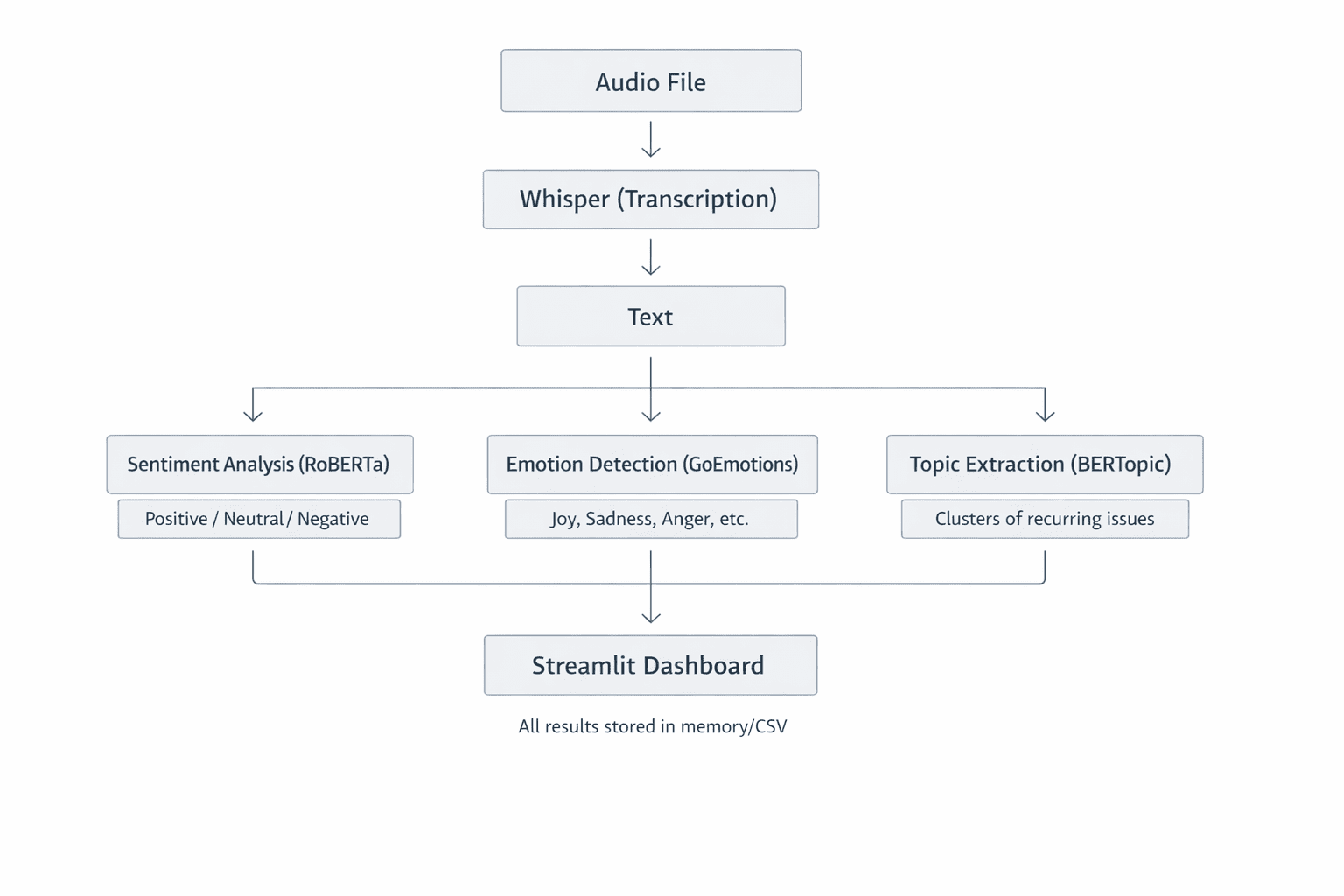
Once the audio has been transcribed into text, the next critical step is to understand the sentiment and emotions conveyed by the customer. This is achieved using advanced natural language processing (NLP) models from the Hugging Face Transformers library. Specifically, the project utilizes the cardiffnlp/twitter-roberta-base-sentiment-latest model, a RoBERTa-based model fine-tuned on a vast dataset of social media text. This particular model is well-suited for analyzing conversational data, as social media language often mirrors the informal and context-rich nature of customer interactions.
Sentiment vs. Emotion: A Deeper Understanding
It’s important to distinguish between sentiment and emotion analysis.
- Sentiment Analysis: This process categorizes text into broad emotional valences: positive, neutral, or negative. A fine-tuned Transformer model like RoBERTa excels here because it can grasp context, nuances, and sarcasm, which simpler lexicon-based methods often miss. For instance, "The service was surprisingly good" would be correctly identified as positive, despite the word "surprisingly."
- Emotion Detection: This goes a step further by identifying more granular emotional states such as joy, sadness, anger, surprise, fear, and disgust. Detecting both sentiment and specific emotions provides a richer, more comprehensive understanding of the customer’s experience.
The Transformer model processes text by breaking it down into tokens (words or sub-word units) and then feeding these tokens through its complex neural network layers. The final layer typically uses a softmax activation function to output probabilities for each sentiment or emotion class. These probabilities sum to 1, indicating the model’s confidence in each classification. For example, a sentiment analysis might yield: positive (0.85), neutral (0.10), negative (0.05), indicating an overall positive sentiment.
Code Implementation for Sentiment Analysis:
from transformers import AutoModelForSequenceClassification, AutoTokenizer
import torch.nn.functional as F

class SentimentAnalyzer:
    def __init__(self):
        # Loads the pre-trained RoBERTa model for sentiment analysis.
        model_name = "cardiffnlp/twitter-roberta-base-sentiment-latest"
        self.tokenizer = AutoTokenizer.from_pretrained(model_name)
        self.model = AutoModelForSequenceClassification.from_pretrained(model_name)

    def analyze(self, text):
        """
        Analyzes the sentiment of a given text.

        Args:
            text (str): The input text to analyze.

        Returns:
            dict: A dictionary containing the predicted label (positive, neutral, negative),
                  scores for each label, and a compound score.
        """
        # Tokenizes the input text, preparing it for the model.
        # return_tensors="pt" specifies PyTorch tensors. truncation=True handles texts longer than the model's max input length.
        inputs = self.tokenizer(text, return_tensors="pt", truncation=True)

        # Passes the tokenized input through the model.
        outputs = self.model(**inputs)

        # Applies softmax to convert raw logits into probabilities.
        probabilities = F.softmax(outputs.logits, dim=1)

        # Maps probabilities to predefined labels.
        labels = ["negative", "neutral", "positive"]
        scores = label: float(prob) for label, prob in zip(labels, probabilities[0])

        # Calculates a compound score for easier interpretation.
        # This score ranges from -1 (very negative) to +1 (very positive).
        compound_score = scores["positive"] - scores["negative"]

        return
            "label": max(scores, key=scores.get), # The label with the highest probability
            "scores": scores,
            "compound": compound_score
The compound score is a particularly useful metric, providing a single, easy-to-interpret value that summarizes the overall sentiment. A score near +1 indicates strong positivity, while a score near -1 signifies strong negativity. This metric is invaluable for tracking sentiment trends over time or across different customer segments.
Why Avoid Simple Lexicon Methods?
Traditional sentiment analysis often relied on lexicon-based approaches, such as VADER (Valence Aware Dictionary and sEntiment Reasoner). While these methods can be quick and require less computational power, they suffer from significant limitations:
- Lack of Contextual Understanding: They often fail to grasp nuances, sarcasm, or the impact of negations. For example, "not bad" might be misclassified as negative if only "bad" is considered.
- Limited Vocabulary: Their performance is tied to the predefined dictionary of words and their associated sentiment scores.
- Inability to Handle Domain-Specific Language: They may not accurately interpret sentiment in specialized contexts or industries.
Transformer-based models, on the other hand, learn the intricate relationships between words and understand how their meaning changes based on context, leading to far more accurate and reliable sentiment analysis for real-world applications.
Extracting Topics with BERTopic
Understanding sentiment is only part of the picture. To truly gain actionable insights, businesses need to know what customers are talking about. This is where BERTopic comes into play. BERTopic is an unsupervised topic modeling technique that automatically discovers themes and patterns within a collection of documents without requiring pre-defined categories.
How BERTopic Works:
- Document Embeddings: BERTopic first converts each document (in this case, customer call transcripts or segments of them) into a dense vector representation, known as an embedding. This is achieved using powerful language models like Sentence-BERT, which capture the semantic meaning of the text.
- Dimensionality Reduction: The high-dimensional embeddings are then reduced to a lower-dimensional space using techniques like UMAP. This step helps to cluster similar documents together.
- Clustering: Algorithms like HDBSCAN are applied to the reduced embeddings to group documents that are semantically similar. Each cluster represents a potential topic.
- Topic Representation: Finally, BERTopic uses a class-based TF-IDF (c-TF-IDF) approach to identify the most representative words for each cluster, thereby defining the topic.
This process allows BERTopic to identify topics such as "billing issues," "technical support inquiries," "product feedback," or "shipping delays" purely from the text data. Critically, BERTopic understands semantic similarity, meaning that phrases like "delivery late" and "shipping delay" will be grouped under the same topic because they convey a similar meaning, a significant advantage over older methods like Latent Dirichlet Allocation (LDA).
Code Implementation for Topic Extraction:
from bertopic import BERTopic

class TopicExtractor:
    def __init__(self):
        # Initializes BERTopic with a Sentence-BERT embedding model.
        # min_topic_size specifies the minimum number of documents required to form a topic.
        # verbose=True displays progress messages during fitting.
        self.model = BERTopic(
            embedding_model="all-MiniLM-L6-v2", # A good general-purpose embedding model
            min_topic_size=2,
            verbose=True
        )

    def extract_topics(self, documents):
        """
        Extracts topics from a list of documents (transcribed call segments).

        Args:
            documents (list): A list of strings, where each string is a document (e.g., a call transcript or segment).

        Returns:
            dict: A dictionary containing topic assignments for each document,
                  keywords for each topic, and detailed topic distribution information.
        """
        # Fits the BERTopic model to the provided documents and transforms them into topic assignments.
        # The first run for fitting can take a significant amount of time depending on the number of documents.
        topics, probabilities = self.model.fit_transform(documents)

        # Retrieves information about all identified topics.
        topic_info = self.model.get_topic_info()

        # Extracts the top 5 keywords for each identified topic.
        # Excludes topic -1, which represents outliers or documents not assigned to any specific topic.
        topic_keywords =
            topic_id: self.model.get_topic(topic_id)[:5]
            for topic_id in set(topics) if topic_id != -1


        return
            "assignments": topics, # A list indicating which topic each document belongs to.
            "keywords": topic_keywords, # A dictionary mapping topic IDs to their top keywords.
            "distribution": topic_info # Detailed information about each topic (e.g., document count, representation).
It’s important to note that topic extraction is most effective when performed on a collection of documents. Therefore, for analyzing individual calls, the model is typically fitted on a larger dataset of historical calls, and then applied to new, individual call transcripts to assign them to existing topics. This ensures that the identified topics are representative of broader customer concerns.
Building an Interactive Dashboard with Streamlit
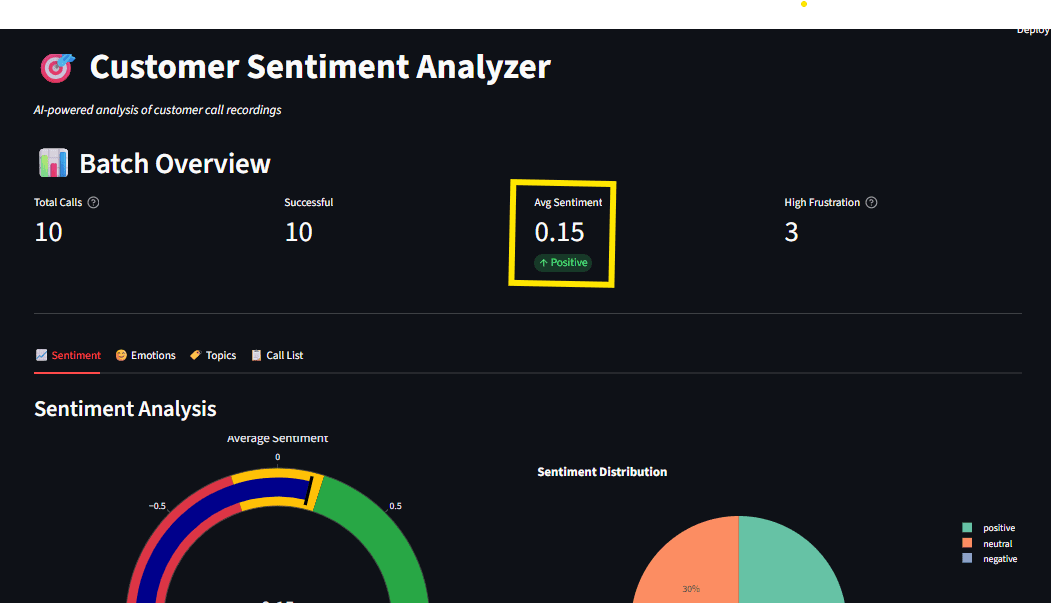
The ultimate goal of this project is to make the insights derived from call analysis easily accessible to business users, not just data scientists. Streamlit, a popular open-source framework, is used to build an interactive web-based dashboard that transforms raw analytical data into digestible visualizations. Streamlit allows developers to create dynamic web applications directly from Python scripts with minimal front-end coding.
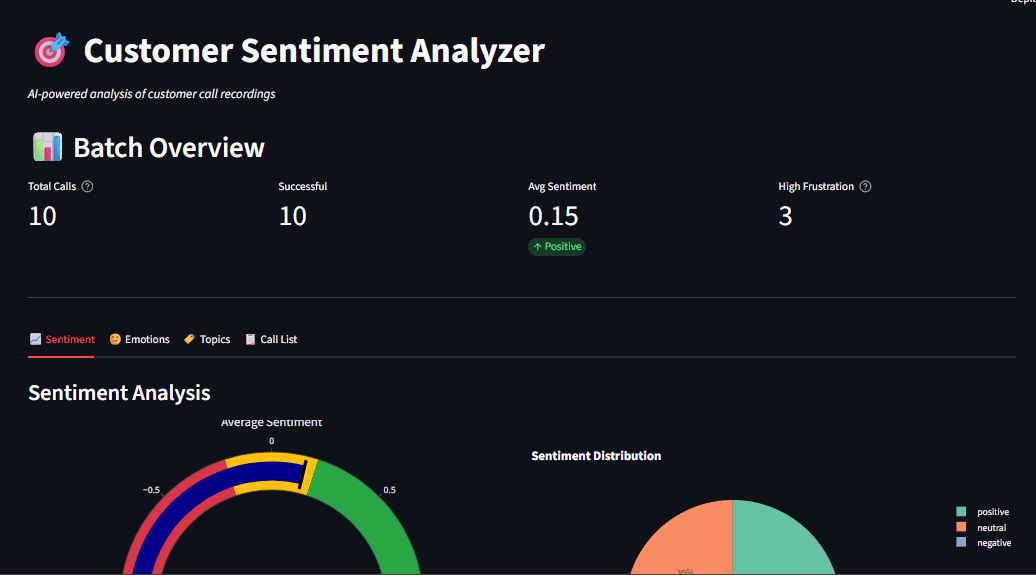
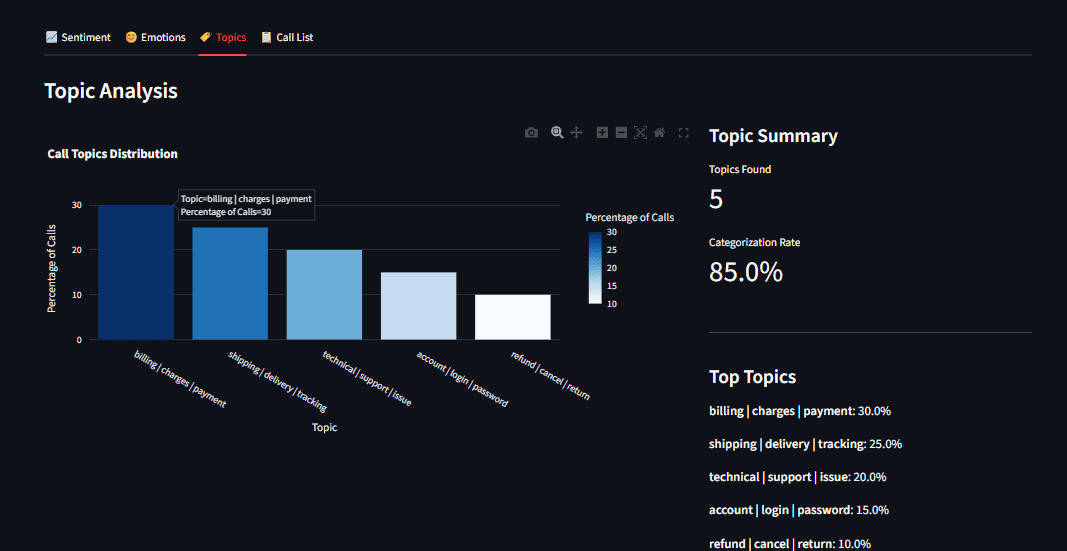
The dashboard provides a comprehensive overview of customer sentiment and topics, featuring:
- Sentiment Gauge: A visual representation of the overall sentiment distribution (positive, neutral, negative).
- Emotion Radar Chart: A radar chart displaying the prevalence of different detected emotions.
- Topic Distribution Bar Chart: A bar chart illustrating the frequency of each identified topic.
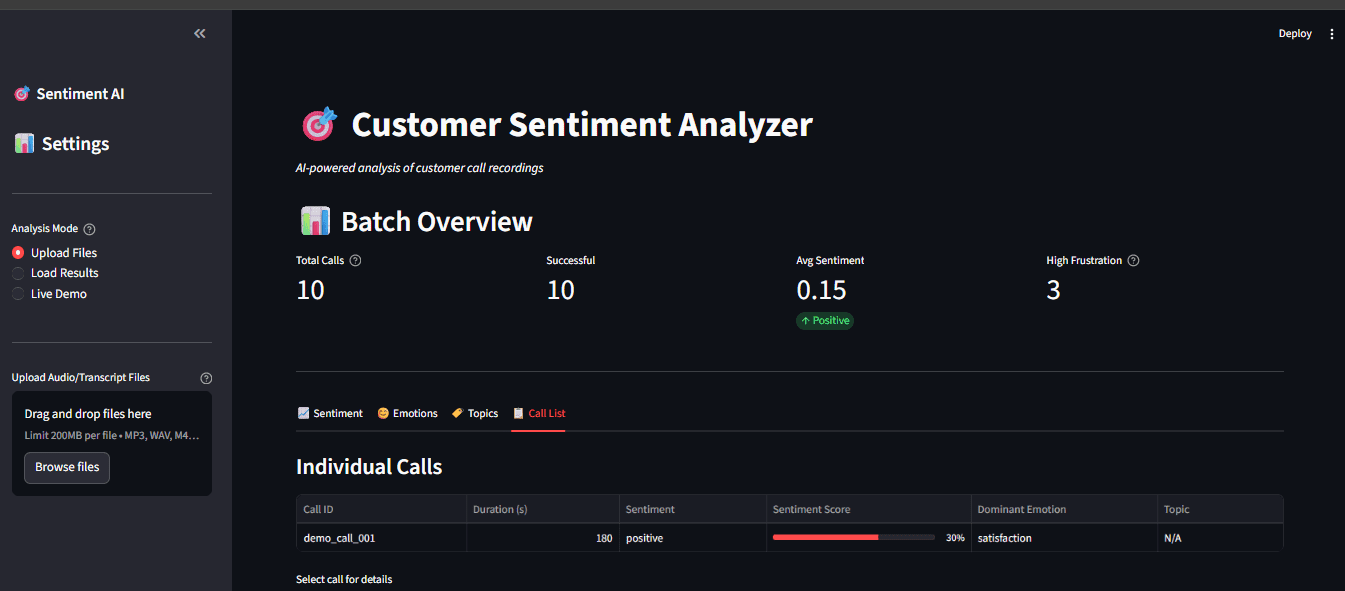
- Call Transcript Viewer: The ability to view individual call transcripts with associated sentiment and topic assignments.
Code Implementation for Dashboard Structure:
import streamlit as st
# Assuming 'pipeline' is an instance of a class that orchestrates the entire analysis process
# from your_pipeline_module import CallProcessor
# pipeline = CallProcessor() # Example initialization

def main():
    st.title("Customer Sentiment Analyzer")

    # File uploader for multiple audio files.
    uploaded_files = st.file_uploader(
        "Upload Audio Files",
        type=["mp3", "wav"], # Accepted file types
        accept_multiple_files=True # Allows uploading multiple files at once
    )

    if uploaded_files and st.button("Analyze"):
        with st.spinner("Processing..."):
            # Processes a batch of uploaded audio files.
            # This method would call the transcriber, sentiment analyzer, and topic extractor.
            results = pipeline.process_batch(uploaded_files)

        # Displaying key visualizations in a two-column layout.
        col1, col2 = st.columns(2)
        with col1:
            # Placeholder for sentiment gauge visualization.
            st.plotly_chart(create_sentiment_gauge(results))
        with col2:
            # Placeholder for emotion radar chart visualization.
            st.plotly_chart(create_emotion_radar(results))

        # Further display logic for topic distribution, individual transcripts, etc. would follow.

# Placeholder functions for creating charts (these would be implemented using Plotly or similar libraries)
def create_sentiment_gauge(results):
    # ... implementation to create sentiment gauge chart ...
    pass

def create_emotion_radar(results):
    # ... implementation to create emotion radar chart ...
    pass

if __name__ == "__main__":
    main()
Caching for Enhanced Performance
Streamlit’s execution model involves re-running the entire script on every user interaction. For computationally intensive tasks like loading large AI models, this can lead to significant delays. To mitigate this, Streamlit offers caching mechanisms. The @st.cache_resource decorator is used to ensure that heavy models are loaded only once and persist across user sessions. This dramatically improves the responsiveness of the dashboard.
@st.cache_resource
def load_models():
    # This function loads all necessary models (Whisper, RoBERTa, BERTopic).
    # The models will be loaded only the first time this function is called.
    return CallProcessor() # Assuming CallProcessor initializes all components

# Load the models once and reuse them throughout the application's lifetime.
processor = load_models()
Real-Time Processing and User Feedback
When a user uploads an audio file and initiates the analysis, the dashboard provides immediate feedback using a spinner. This "waiting" indicator assures the user that the system is actively processing their request. Once the analysis is complete, the results are displayed, including the transcribed text, sentiment analysis summary, and topic assignments.
if uploaded_file: # Assuming a single file upload scenario for simplicity
    with st.spinner("Transcribing and analyzing..."):
        # Process a single audio file.
        result = processor.process_file(uploaded_file)
    st.success("Done!") # Success message
    st.write(result["text"]) # Display transcribed text
    st.metric("Sentiment", result["sentiment"]["label"]) # Display sentiment label
Key Features and Practical Lessons
This project offers several valuable practical lessons for anyone looking to implement similar AI solutions:
- Audio Processing Nuances: Understanding how audio is represented (e.g., mel spectrograms) and how AI models process this information is key. The mel scale’s mimicry of human hearing is a testament to how well AI can be tuned to perceive data.
- Transformer Output Interpretation: Differentiating between activation functions like Softmax (for multi-class classification where classes are mutually exclusive, like sentiment) and Sigmoid (for multi-label classification where multiple classes can be true simultaneously, like emotions) is crucial for accurate model interpretation.
- Effective Data Visualization: The use of interactive tools like Plotly is vital for communicating complex data insights. Interactive charts allow users to explore data dynamically, zooming in on specific timeframes or clicking on legends to filter information, transforming raw analytics into actionable intelligence.
Running the Application
The project is designed for ease of use and provides multiple modes of operation:
-
Test NLP Models: To quickly verify that the core NLP models are functioning correctly without requiring audio files:
python main.py --test-nlpThis command runs sample text through the sentiment and topic models, displaying results in the terminal.
-
Analyze a Single Recording: To process an individual audio file:
python main.py --audio path/to/your/call.mp3This will output the transcription, sentiment, and topic analysis for the specified file.
-
Batch Process a Directory: To analyze all audio files within a specified directory:
python main.py --batch data/audio/This is ideal for processing a collection of recordings efficiently.
-
Launch the Interactive Dashboard: For the full user experience, including visualizations and interactive exploration:
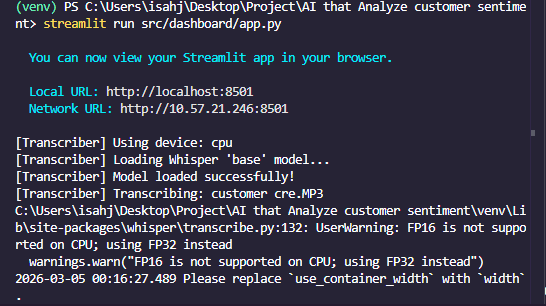
python main.py --dashboardAfter running this command, open your web browser and navigate to
http://localhost:8501to access the dashboard.
Conclusion
The developed customer sentiment analyzer represents a significant advancement in how businesses can leverage AI for customer interaction analysis. By integrating powerful open-source tools like OpenAI’s Whisper, Hugging Face Transformers, BERTopic, and Streamlit, the project delivers a comprehensive, offline-capable solution for transcribing calls, analyzing sentiment and emotions, and extracting key topics. This system provides a robust foundation for improving customer service, identifying product or service issues, enhancing customer satisfaction, and driving business growth.
The paramount advantage of this local AI approach is its unwavering commitment to data privacy and security, ensuring that sensitive customer information never leaves the user’s control. Furthermore, the elimination of recurring API costs makes it an economically viable solution for businesses of all sizes.
The complete codebase is readily available on GitHub at An AI that Analyzes customer sentiment. By cloning this repository and following the provided setup instructions, organizations can begin unlocking the wealth of insights hidden within their customer call recordings, transforming raw data into strategic business intelligence. This project exemplifies the power of open-source AI to democratize advanced analytical capabilities, making them accessible and practical for real-world applications.