

The gap between elite proprietary artificial intelligence systems and open-weight alternatives has narrowed dramatically, shifting the paradigm of how everyday users, developers, and enterprises interact with machine learning technology. Recent industry data indicates that open-weight AI models now trail the absolute best closed-source models by an average of only four months in capability. More importantly, a growing proportion of these high-performing models can run locally on consumer hardware that millions of users already own, fundamentally altering the economics of artificial intelligence by eliminating mandatory monthly subscription fees and addressing mounting privacy concerns tied to cloud-based data processing.
The term open-weight refers to a distribution model where creators publish the foundational parameter files—the numerical representations of everything the model has learned during its training phase—allowing anyone to download, inspect, and deploy the software independently. Historically, interacting with advanced language models meant paying recurring fees of approximately $20 per month for proprietary cloud services like OpenAI’s ChatGPT, Anthropic’s Claude, or Google’s Gemini. Furthermore, using these cloud services requires transmitting private prompts, proprietary code, and sensitive documents to corporate servers. Legal precedents, such as court orders compelling tech firms to preserve user conversation logs including deleted data, have heightened user awareness regarding data retention policies and digital surveillance.
Local deployment eradicates these privacy vulnerabilities. When an open-weight model runs directly on a personal computer, interactions remain strictly confined to that machine. Platforms such as Ollama and LM Studio have democratized this process, providing streamlined, accessible gateways to sophisticated AI architectures without requiring a background in advanced systems engineering.
Understanding the Hardware Requirements and Mechanics of Local AI
Running a large language model locally requires navigating specific hardware constraints, primarily concerning memory capacity and processing architecture. AI models are quantified by their parameter counts—the internal variables adjusted during training—which directly correlate with file size and memory consumption. To operate efficiently, a model must fit entirely within a computer’s memory architecture, specifically the graphics card’s video memory (VRAM) or the unified memory found in modern architectures like Apple Silicon Macs.

As a general baseline, running smaller compressed models requires a minimum of 8GB of VRAM or system RAM. However, serious deployment of modern intermediate models demands dedicated gaming or enterprise graphics hardware with 24GB or more of VRAM, or unified memory systems such as high-end Mac Minis or specialized AI workstations. To bridge the gap between large models and modest hardware, developers rely on a technique known as quantization. Quantization compresses a model by storing its weights with lower-precision data types—such as 8-bit integers (int8) instead of the standard 32-bit floating point (float32). While this significantly reduces memory footprints and enables models to run on consumer hardware, it can introduce a minor degradation in model accuracy.
System recommendations vary by platform and software framework. For Apple Silicon Macs running macOS 14 or newer, software suites like LM Studio recommend 16GB or more of unified memory, though 8GB models can support smaller variants; older Intel-based Macs are largely unsupported. On Windows, recommended specifications include at least 16GB of system RAM, a minimum of 4GB of dedicated VRAM, and a processor supporting AVX2 instructions.
Software ecosystems have evolved to accommodate these varying hardware tiers. For instance, Google’s Gemma 4 series offers various model sizes, with download sizes ranging from approximately 4.6GB to 20GB depending on the specific quantization level and parameter count. Specifically, the Gemma 4 26B variant requires between 16GB and 19GB of memory, while the larger 31B version demands 19GB to 20GB. Similarly, OpenAI’s open-weight gpt-oss series features a 20B model requiring 16GB of memory, alongside a heavier 120B model that can operate within an 80GB memory ceiling.
A Comparative Guide to Deployment Tools: Ollama vs. LM Studio
Deploying open-weight models locally typically involves two primary free utilities: LM Studio and Ollama. Each platform caters to distinct user preferences, ranging from graphical simplicity to developer-centric command-line control.
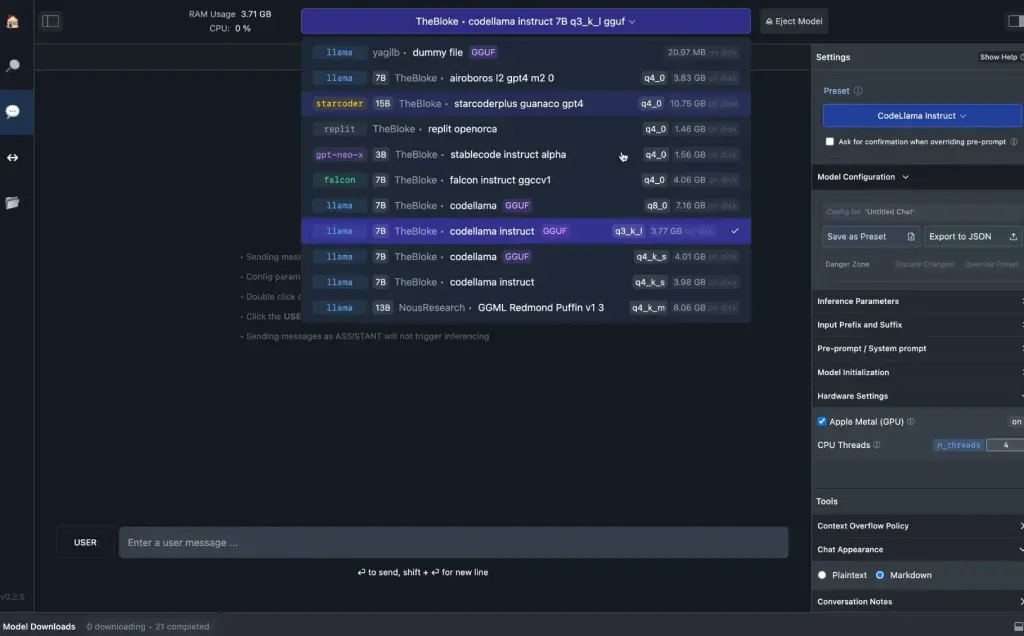
LM Studio serves as the premier choice for users seeking a polished, user-friendly graphical user interface (GUI). Users can download the installer for macOS, Windows, or Linux, search for desired models directly within the application’s interface—which interfaces with public repositories like Hugging Face—download the corresponding weight files, and immediately initiate an offline chat session. LM Studio operates entirely offline once the models are downloaded, ensuring that uploaded documents and conversation histories never traverse an external network.

Conversely, Ollama is engineered primarily for developers and technically proficient users who prefer interacting via the command-line interface (CLI). Installation is executed through straightforward terminal scripts, such as a curl command for macOS and Linux or a PowerShell command for Windows. Once installed, users can pull models using simple syntax—such as typing ollama pull gemma4:e2b to download and ollama run gemma4:e2b to launch an interactive chat session. Ollama also establishes a local application programming interface (API) running at http://localhost:11434, enabling other desktop applications to leverage the local model seamlessly.
It is worth noting that certain platforms offer hybrid solutions. For example, model identifiers ending in the :cloud designation within Ollama point to cloud-executed instances rather than local downloads. While these require an internet connection, they maintain strict privacy guarantees, ensuring that API calls and prompts are neither stored on provider servers nor utilized for subsequent model training.
Licensing Frameworks and the Rise of Customization
The proliferation of open-weight models is heavily governed by open-source and permissive licensing frameworks. Prominent releases, such as DeepSeek’s R1 series, are distributed under the MIT License, which explicitly supports commercial use, modification, and the creation of derivative works. Similarly, Google’s Gemma models and OpenAI’s open-weight initiatives frequently ship under the Apache 2.0 license.
These permissive licenses grant developers and enterprises unprecedented freedom to modify, fine-tune, and adapt foundational models to specialized domains. In a professional context, an organization may require an AI model heavily optimized for legal analysis or medical diagnostics, rendering general-purpose coding proficiency secondary. Local open-weight deployment allows practitioners to fine-tune models on proprietary datasets without exposing sensitive intellectual property to third-party cloud vendors.
Furthermore, recent algorithmic innovations have drastically improved the operational efficiency of local hardware. Technologies like Google’s Multi-Token Prediction drafters for Gemma 4 utilize speculative decoding, a process where a smaller secondary model proposes multiple token sequences ahead of time, which the larger primary model then verifies in a single computational pass. This technique has been shown to accelerate text generation speeds by up to three times on identical consumer hardware, mitigating one of the traditional performance bottlenecks of local AI execution. Additionally, the integration of Model Context Protocol (MCP) servers into platforms like LM Studio enables local models to securely access local file systems and perform targeted web retrievals.
Current Limitations and the Continued Supremacy of Cloud Infrastructure
Despite significant strides in closing the capability gap, local open-weight models still encounter distinct limitations when compared against hyperscale cloud infrastructure. The four-month performance lag represents the absolute best-performing open models, many of which far exceed the physical constraints of consumer hardware. For instance, advanced frontier architectures like Alibaba’s Qwen3.8-Max boast staggering totals of 2.4 trillion parameters, with 95 billion active parameters dynamically engaged during inference—scale requirements that necessitate massive enterprise data centers rather than local desktop computers.
When a local model exceeds available VRAM and spills over into standard system RAM, inference speeds can degrade severely, resulting in sluggish response times. Furthermore, handling larger context windows—such as Gemma 4’s 128K to 256K token limits, which allow the model to ingest massive volumes of text simultaneously—demands exponential increases in memory overhead. Cloud-based frontier models abstract these hardware complexities entirely, maintaining superior performance on complex reasoning benchmarks, multi-step problem solving, and vast context synthesis.
Implications for the AI Landscape
The mainstream viability of local AI marks a critical decentralization phase within the broader technology sector. By shifting computing responsibilities from centralized cloud monopolies to the end user’s hardware, open-weight models challenge the subscription-based economic model that has dominated the generative AI boom.
As hardware manufacturers continue to integrate dedicated neural processing units (NPUs) and expand unified memory capacities across consumer PCs, laptops, and mobile devices, the boundary between local and cloud computing will continue to blur. For privacy-conscious consumers, developers seeking zero-cost experimentation, and enterprises requiring absolute data sovereignty, local open-weight deployment has transitioned from an experimental hobbyist pursuit into a robust, practical alternative to mainstream commercial chatbots.